If you've worked in software long enough, you've felt the pain of legacy code. It's that old application that's too valuable to abandon, but each update makes you a little nervous. I have guided dozens of companies and digital nomads through this transition, and in this guide, I want to show you—step by step—how a Laravel legacy code upgrade can bring security, modern features, and peace of mind without unpredictable downtime.
Why upgrading old Laravel code matters
Every year, new vulnerabilities are discovered in even the most popular frameworks. For example, the NIST National Vulnerability Database detailed a reflected cross-site scripting flaw, CVE-2024-13919, affecting several recent Laravel versions. With threats like these, remaining on an outdated stack is an open invitation to attackers.
Outdated Laravel projects often lack security fixes, making them attractive targets for exploits and data breaches.
In my experience, clients come to me for a Laravel legacy code upgrade not just because of security. They also want new features, developer efficiency, and a smoother user experience. When you upgrade, you unlock all the latest features that modern Laravel brings—like improved job queues, better database performance, Laravel Octane, and more.
The risks of not modernizing
I've seen first-hand how old Laravel and PHP codebases restrict business growth. Buggy code turns even simple changes into weeklong chores. Teams hesitate to make improvements, fearing that the legacy code will break elsewhere.
- Compatibility problems: Older Laravel versions don't run well with new PHP releases or cloud platforms.
- Lost developer productivity: New team members spend too much time learning weird workarounds and outdated patterns.
- Technical debt grows: Each hack to keep code working adds more debt.
On top of this, evaluations from Princeton University Web Development Services of over 50 custom PHP apps found most needed urgent replacement to meet security and maintainability standards. I see this in my practice all the time.
Leaving legacy code untouched is betting against your own business.
Clients coming from other service providers often find their upgrade projects stalled because not every freelancer or agency understands these unique legacy challenges. That's where an expert makes all the difference.
My approach to upgrading legacy Laravel projects
I've spent more than 16 years on PHP applications, so I know that each codebase has a unique story. When a client approaches me for a Laravel modernization, I look at their technical stack, team capacity, and business targets.
Here’s how I usually structure the process:
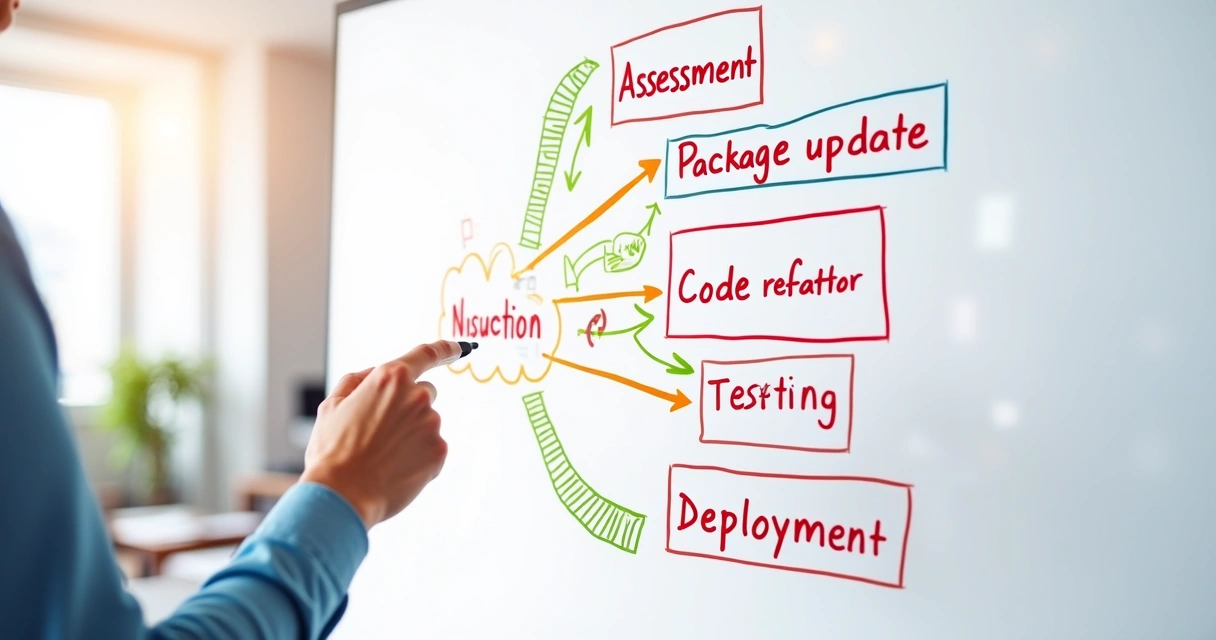
- Assess the existing codebase. I run a deep technical audit to spot deprecated features, outdated packages, tight couplings, and customizations that might slow migration. This gives us a map of the migration terrain.
- Create a target version roadmap. Decide which Laravel version fits best. Sometimes, going all the way to the latest isn't practical in one step—for example, some businesses must move from Laravel 5.5 to Laravel 9 gradually.
- Plan thorough testing. I always build out PHPUnit and feature test coverage alongside migration, because automated tests make safe refactoring possible.
- Map out dependencies. All third-party packages are reviewed. Do they support the target Laravel version? Are they abandoned? Can any be replaced by new Laravel core features?
- Define a migration workflow. I propose either a big-bang upgrade (less common, but possible for small codebases) or an incremental approach, with clear checkpoints and backup strategies at each phase.
This detailed process is what addresses both technical blockers and business goals. It’s quite different from generic agency quotes that only promise “smooth transition.” In my work, assurance comes from thoroughness, not just buzzwords.
Planning your Laravel migration: foundational steps
No two migrations are the same, but a few guidelines hold in nearly every scenario. If you want confidence that your upgrade project will finish on schedule and budget, these steps will help.
Step 1: Evaluate and document the current system
I always start with a walk-through of the code and infrastructure. Some tips I use:
- Collect an inventory of Laravel and PHP versions.
- Note all database vendors and versions.
- Map third-party libraries, Service Providers, and integrations—anything outside core Laravel.
- List customizations (custom Service Providers, vendor patches, homegrown packages).
It's surprising how often even senior teams lose sight of what’s running. Documentation up front avoids nasty surprises later.
Step 2: Dependency and package modernizing
Dependencies are a major source of headaches in every legacy Laravel upgrade. I review all installed Composer packages, seeking out:
- Abandoned or unsupported packages
- Vendor forks and packages tied to older PHP features
- Overlapping functionality by Laravel core and packages
Next, I sketch a migration map: which packages must be swapped, upgraded, or rewritten. Sometimes, this means moving old packages to modern Laravel native features, which helps long-term maintainability.
Keeping third-party dependencies healthy is as important as updating Laravel itself in legacy upgrades.
Step 3: Build a robust backup and testing plan
Before touching a line of code, I always put in place:
- Replication or backups of codebase and databases
- Staging and testing environments that mirror production
- Automated test suites—if the project has none, I write tests for sensitive features first
This shields the business from costly mistakes. Testing isn’t a luxury; it’s a core part of a responsible upgrade.
How I choose between incremental and full upgrades
Some projects can migrate directly from old Laravel (for example, 5.5) straight to the latest LTS. But many can’t, so picking the right approach is critical.
Choose your migration approach based on code complexity and business uptime needs.
Incremental migration: my go-to for large apps
If the project is large or contains lots of third-party integrations, I advise splitting the journey into manageable steps. For instance, upgrade Laravel from 5.5 to 6, then 6 to 8, and finally to 10 or 11.
The benefits:
- Reduces the risk of breaking everything at once
- Makes fixing deprecations and refactoring more predictable
- Keeps the app running—minimal downtime
In one enterprise scenario, I helped a marketplace platform move from Laravel 6 to 10 in three phases, focusing on business-critical components before each cutover. It made the process manageable and let the team learn as we progressed.
Full migration: when speed is possible
For small apps under active development, a single upgrade might be possible. This approach works only if:
- Test coverage is good
- There are few business-critical integrations
- The team can accept a short maintenance window
I always recommend staging environments, snapshot rollbacks, and user acceptance testing before the cutover.
How I use Rector PHP and tools to automate code modernization
For legacy code, manual refactoring can eat up weeks. That’s where Rector PHP makes a difference. This open-source tool scans your code for old syntax and auto-applies modern patterns to match your target Laravel version.
Rector PHP smartly transforms outdated syntax—like array access on collections, route definitions, controllers setup, and more—without breaking your tests.
In one client project, I configured Rector to update custom Form Requests, factor out old Traits, and clean up outdated Auth boilerplate. It upgraded thousands of lines in minutes. The quality of the result depends heavily on writing custom Rector rules—and that’s one of the ways I bring deep value compared to many competitors.
Beyond Rector, I use:
- PHPStan for static analysis—detects bugs ahead of time
- Laravel Shift (for speedy, scriptable upgrades)
- Laravel Pint or PHP-CS-Fixer for clean, modern code style
Not all freelancers or companies use these tools to their full potential. With me, you get a tailored automation stack instead of generic scripts that miss the nuances of your codebase.
Real-world examples: tackling upgrades step by step
Words are good, but practical examples really show the value of expert guidance. Here’s a breakdown of common upgrade cases I handle.
Handling deprecated features and core changes
Laravel drops many methods and packages in each major version. For example:
- String helpers like
str_slug()andarray_get()now live in theStrandArrfacades or external packages. I write transformation scripts to automate these updates across the codebase. - Middleware signature changes: The request signature in middleware changes often between releases. Reviewing all custom middleware prevents silent failures after migration.
- Authentication rework: Upgrading from the legacy
auth.phpstructure to Laravel's latest Guards and Policies structure is always on my checklist.
Automating these changes is not always plug-and-play—you need tests and tailored scripts to ensure nothing gets missed.
Database migration and schema updates
Often, legacy apps use features like enum types or custom timestamps, blocked by new Laravel or cloud databases. I tackle these problems stepwise:
- Audit all database columns and legacy data types
- Rewrite migrations to match new Laravel conventions
- Use Doctrine DBAL, when needed, for advanced alterations
- Test schema changes in a staging environment with production data
Never touch the production database before staging proves your migrations are safe.
Resolving compatibility and integration headaches
Legacy code often uses old API versions or external services that must be upgraded. In one of my recent projects, the client's CRM API library was abandoned and conflicted with modern PHP versions. My team and I rewrote a wrapper layer using Guzzle HTTP to bridge the gap while keeping the business running the whole time.
Testing best practices for Laravel code modernizations
With every Laravel legacy upgrade I undertake, comprehensive testing becomes the backbone of project confidence. It’s not uncommon for teams to have little or no automated tests on their historical projects.
- Unit tests for controllers, models, and custom helpers—I often build these tests from scratch if missing.
- Feature tests to simulate critical user flows (logins, transactions, and integrations).
- Database tests with test doubles or SQLite to ensure migrations match real production changes.
- Manual QA—even automated pipelines should have a second pair of eyes on key features.
Good test coverage is your upgrade insurance policy—saving time in debugging and post-upgrade firefighting.
When you work with me, you get not just an upgraded app, but often a brand new set of robust tests that guard your future deployments. This is a place where I consistently outperform competitors, who may deliver running code but without the safety net.
Managing package upgrades and solving dependency issues
One of the trickiest parts of a Laravel legacy code upgrade is dealing with third-party dependencies, especially when code relies on libraries that no longer keep pace with the ecosystem.
I always check Composer packages via composer outdated and read changelogs to anticipate breaking changes. My clients benefit from my knowledge of the most reliable modern packages—and my ability to refactor or replace those that stall an upgrade.
- Move to Laravel core features when possible—reducing maintenance burden over time.
- Replace abandoned libraries with modern, well-maintained alternatives.
- Patch and contribute fixes to packages, if needed, to help the Laravel community as a whole.
In cases where clients have complex third-party licensing or compliance needs, I work alongside legal or business teams to ensure those changes meet both software and business objectives. This attentive process is what sets my freelance service apart from larger agencies, who may not address these legal or audit surprises until late in the upgrade.
Cutting downtime and ensuring business continuity
A big concern for any business owner or manager is: How do we avoid losing revenue and users during the migration? Over the years, I have built a reliable process to keep risk and downtime low.
Key strategies I rely on:
- Shadow deployments—run the new codebase in “read-only” mode alongside the current live version for real-world testing.
- Blue/green deployment strategies—instant switchover, instant rollback if something fails.
- Rollback plans—snapshotting code and databases, with explicit steps to return to the old version in minutes.
- Scheduled maintenance windows—coordinated with business teams to pick off-peak hours for go-live.
The difference between a stressful migration and a smooth one is having a clear continuity plan—with rehearsals, rollback paths, and user communication—at every stage.
Clients often tell me their biggest relief in working with me is knowing I plan for both success and the unexpected, which is quite rare among less experienced freelancers.
Common challenges and how I tackle them
No mission-critical upgrade is without surprises, but I’ve learned how to anticipate the recurring traps.
Data integrity during migration
Moving between Laravel and database versions can create subtle bugs—data truncation, encoding problems, or orphaned records. I fight this with:
- Automated data validation scripts both before and after migration
- Trial migrations using recent production snapshots—catch errors without risking live data
- Schema comparison tools to detect missing indexes, wrong datatypes, or soft deletes gone haywire
Integrating with current workflows and teams
Legacy apps often tie into dozens of business workflows—ERP systems, staff routines, CRMs. I map all key integrations first, and I always write “bridges” or staging adapters if the old app and the upgraded code must run together for a while.
Business continuity goes beyond servers. It means keeping your people informed, your customers satisfied, and your revenue untouched. That’s my focus as a seasoned Laravel consultant and freelancer.
Why clients choose me over agencies and competitors
I’ve worked with clients who previously tried working with popular Laravel migration shops, or agencies that promise one-size-fits-all upgrades. The most common feedback I hear when they come to me is: the project moved slowly, hidden costs appeared, or the migration failed because the nuances of their legacy codebase were not understood.
Having guided businesses of every size, I prefer these winning practices:
- Deep legacy knowledge—I speak old PHP, procedural Laravel, custom factories, and every anti-pattern. Your old code doesn’t scare me.
- Hands-on testing and QA—I deliver both modern Laravel apps and robust automated/manual test suites.
- Direct communication—no project managers as middlemen; every question gets answered by me.
- Results, not just theory—finishing the upgrade, keeping your team productive, enabling growth. That’s my promise.
If you’re considering a Laravel legacy code upgrade, I urge you to review my other resources, such as my practical consulting guide, or the development solution guide. My custom Laravel upgrade and development services are built exactly for owners and CTOs who need confidence and support, every step of the way.
Next steps for your Laravel modernization journey
Upgrading Laravel is more than a technical exercise—it's a strategic decision that secures your business, your customers, and your growth. When you invest in this process, you beat back security risks, cut technical debt, and open the door to the future of cloud apps, AI integrations, and everything the modern web expects.
If you're ready to start, I recommend reading my article on the trends and new tools in 2026 Laravel development, or see the custom Laravel services I offer—from audits to complete rebuilds.
Whether you need guidance, hands-on migration, or after-upgrade support, I am here to deliver results that competitors and agencies can’t match.
If you want a scalable and modern app, don’t wait until you’re forced to upgrade. Contact me for a free assessment. With Adriano Junior, your Laravel codebase will run better, your team will move faster, and your business will stay ahead.
You can also look at my step-by-step guide to scaling Laravel apps securely.
Frequently asked questions
What is a Laravel legacy code upgrade?
A Laravel legacy code upgrade is the structured process of moving an older Laravel application to a newer, supported version, while also updating dependencies, code, and infrastructure to take advantage of new features, security patches, and better performance. This can include everything from migrating code syntax and package versions to refactoring old business logic for modern standards.
How to start upgrading old Laravel projects?
The best way to begin a Laravel upgrade is by running a detailed codebase assessment and documentation of current dependencies, followed by a plan that chooses the right Laravel version and identifies upgrade blockers upfront. Before starting, be sure to back up your application and database, set up a staging environment, and build or improve automated test coverage. Incremental upgrades with checkpoints help ensure stability throughout the process.
Is it worth modernizing legacy Laravel code?
Modernizing old Laravel code is almost always worth it, since it dramatically improves stability, security, and the ability to add new features or integrations. Upgrades also help reduce technical debt and future-proof your investment against end-of-life risks, as noted by academic and industry studies. Most businesses see a decrease in maintenance costs and an increase in developer productivity after a successful upgrade.
What challenges come with Laravel code upgrades?
Common challenges in Laravel code upgrades include dealing with deprecated functions, upgrading custom and third-party packages, resolving incompatibility with new PHP or Laravel versions, and ensuring data integrity when changing database structures. Thorough planning, automated testing, and expert handling of edge cases are key to overcoming these challenges and ensuring a safe migration.
How long does a Laravel upgrade take?
The time needed for a Laravel upgrade can range from one week for small, well-tested apps, to several months for complex or poorly-documented projects. The biggest factors are the size of the codebase, the gap between Laravel versions, test coverage, and the number of package dependencies or customizations. My proven methodology helps to minimize disruptions and keep the project on schedule.