When clients approach me, they often share stories of old applications that still “do the job,” but behind the scenes, cause headaches with maintenance, missing features, and security concerns. For anyone running PHP systems built years ago, this will sound familiar. In this article, I’ll break down how I, Adriano Junior, approach migrating, refactoring, and breathing new life into aging applications using modern Laravel techniques—helping you make sense of options, avoid pitfalls, and keep your business running strong.
What legacy code means for PHP and Laravel applications
The term “legacy code” is thrown around a lot. For Laravel or any PHP application, in my experience, it means:
- No longer actively maintained or using outdated versions (think Laravel 5.x or even older custom code).
- Lacking documentation, automated tests, or knowledge transfer between developers.
- Mixing business logic, UI, and database calls—making updates risky and slow.
- Hard-wired dependencies—sometimes coupled deeply to a specific framework or third-party package.
Strong business cases justify keeping these systems working as long as possible. But as seen in a 2023 audit by the Washington State Auditor’s Office, up to 60% of critical applications in some sectors are now legacy, increasing both security vulnerabilities and maintenance costs.
Old code isn't just old—it might be holding you back.
The hidden cost and risk of ignoring legacy
People sometimes underestimate the risks lurking in these aging apps. Security flaws are common. Features take much longer to add. As research from Stony Brook University (2025) shows, delaying modernization leads to annual costs that can climb to millions, as well as missed opportunities.
A client I worked with recently faced this. Their business logic was scattered across hundreds of PHP files. Onboarding a new developer took weeks. And when a third-party library stopped being supported, they were left scrambling for help. Modernizing brought their product back to life—and freed up resources for growth, not just maintenance.
Planning your migration: all at once, or step by step?
The approach can make or break your upgrade. There are two main migration paths: total rewrite or incremental migration. Having led dozens of projects with all sorts of legacy PHP and old Laravel stacks, I can confidently say: there’s rarely a one-size-fits-all answer. Each business has its own priorities, budgets, and risk tolerance.
- Total Rewrite/Migration: Build the new app in Laravel from scratch. Migrate data and features all at once. Best if the old code is truly unusable—but creates business downtime.
- Incremental Migration: Move pieces over gradually. Integrate new Laravel modules with the old stack using APIs or bridges. Less risky—systems stay online—but more complex for developers.
Phased migrations are my preference for business-critical systems. They reduce risk and allow for continuous delivery of improvements.
The first step: analyzing your existing system
Before touching a line of code, I map out every important function of your application. I use tools to generate code metrics, diagram dependencies, and list every third-party integration. Key tasks include:
- Identifying business rules and “tribal knowledge”: the pieces only long-time staff understand
- Running static analysis to spot high-risk areas (deeply coupled, complex, or duplicated code)
- Documenting database schema and relationships
- Reviewing authentication, file storage, and critical features for security or compliance risk
This careful prep allows me to set a migration plan that matches your business needs—not just technical best practices. As detailed in various Laravel consulting guides, this up-front work pays huge dividends by reducing missed requirements down the road.
Preparing the Laravel environment
I always set up a modern development environment before migration. This might include:
- Latest stable Laravel version (as of 2024, Laravel 11+ is recommended for long-term support)
- Automated testing frameworks like PHPUnit/Pest
- Code style checks with PHP_CodeSniffer or PHP-CS-Fixer
- Local development with Docker or Laravel Sail
A clean, tested Laravel setup makes it far easier to notice when something in the migration doesn’t work as expected.
Database migration: matching old data to new design
Moving the database is often the trickiest part. Legacy systems might use MySQL, PostgreSQL, or even something older. Here’s my usual step-by-step for handling data:
- Reverse-engineer the schema: I use schema visualization tools to map tables, indexes, and relations.
- Define new Eloquent models: These map cleanly to Laravel’s ORM, often revealing issues with naming and normalization.
- Write migration scripts: For non-trivial changes, I build custom ETL routines or use Laravel’s database seeder/migration system to translate, sanitize, and move data.
- Reconcile data differences: Old systems often have fields or records that are no longer used; these must be flagged and safely ignored or archived.
Automated data checks after migration ensure no records are lost, no relationships mangled.
Transitioning business logic and UI
This is the “messy middle” of most migrations, and where experience pays off.
- Business logic is refactored into proper Laravel services, controllers, and models—isolated, tested, and decoupled.
- Old UI templates are rebuilt using Blade or modern SPAs, sometimes keeping some legacy HTML initially to speed the process.
- For incremental approaches, I deploy API bridges: REST or GraphQL interfaces let new Laravel code call out to the old stack (or vice versa) until full switchover.
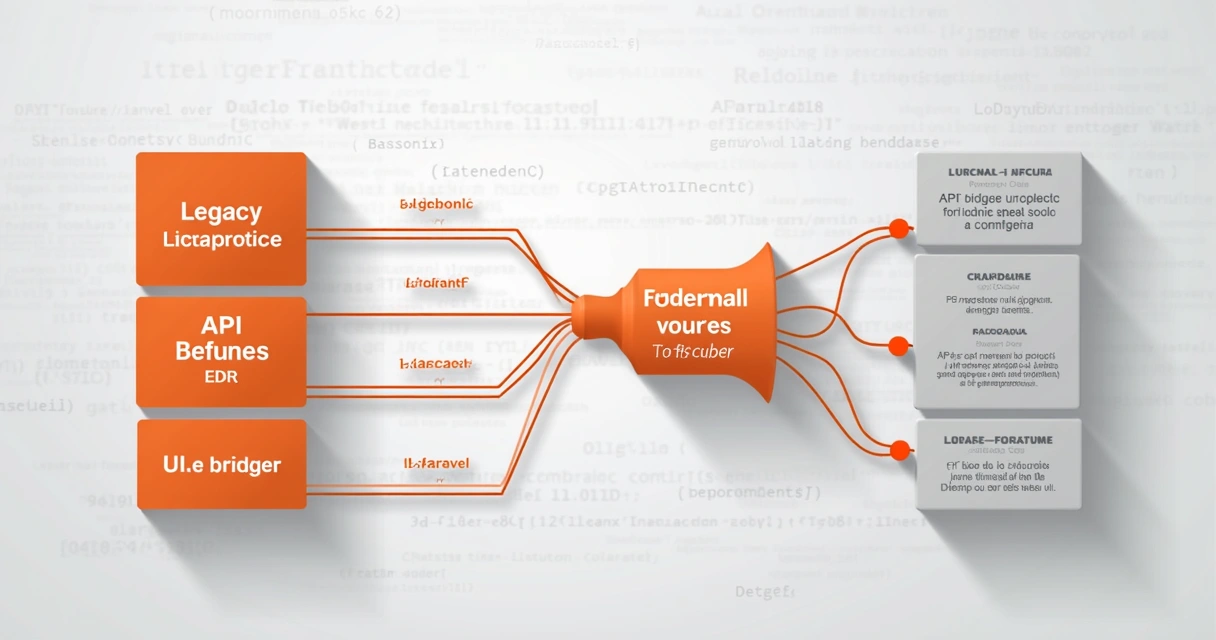
For business leaders, this means you don’t lose months waiting for every feature to be “perfect.” Instead, I roll out new screens and features module by module, gathering feedback early.
Automated refactoring: using tools to speed the process
Refactoring by hand is possible, but risky for large codebases. Modern tools can help. For example:
- Rector: I use Rector to automatically update PHP code for compatibility with modern standards—migrating syntax, method calls, and even some design patterns. It is highly configurable and much safer than manual “find and replace.”
- Laravel Shift or LaraCraft (more limited): useful for smaller or less complex jumps between Laravel versions. Although some developers rely solely on such tools, I always recommend combining them with strong manual review and test coverage.
While competitors may rely only on these tools, what sets me apart is my hands-on, reference-driven approach. I verify all automated changes via robust test suites and peer code reviews, making sure your business logic is never altered by accident.
A tool only helps if you know how to use it—and when not to trust it.
Testing, code quality, and regression risk
If legacy code has no tests, I write a set of baseline functional and smoke tests first. The goal is to “trap” behavior so later I can ensure nothing broke.
- I use Pest or PHPUnit for unit and integration tests, validating business logic and database migrations.
- For UI, I add tests with Laravel Dusk or Cypress for browser-based checking of forms, logins, etc.
All changes go through static analysis and code-style checks. In my experience, an incremental approach lets you roll out tests gradually and catch high-impact issues fast.
Balancing modernization and business continuity
Every client fears “downtime.” This is why, when I manage a Laravel upgrade, I:
- Stage all releases using feature flags or subdomains. New and old features run side by side until proven stable.
- Maintain API compatibility where legacy systems are still in use, limiting risk and ensuring no process disruption.
- Coordinate with your team for user acceptance testing, automating rollbacks for any failed upgrades.
A case study from 2023 at Miami University proved that a stepwise Laravel migration reduced unplanned outages and improved system security, confirming what I see first-hand for my clients.
Continuous delivery means progress without stopping the business.
Integration tips for old and new systems
In many migrations, it’s best to keep some parts of the old application running alongside the new one, at least for a while. Here’s how I make that work smoothly:
- Use APIs or background jobs for cross-system communication. Laravel’s robust queue and schedule systems make it straightforward.
- Employ feature proxies or middleware to redirect some flows to the old backend until they are ported.
- Keep user sessions consistent by centralizing authentication tokens—Laravel Passport or Sanctum are a huge help here.
- Regularly sync or migrate data overnight, minimizing impact to live users.
Addressing performance and scaling with Laravel
Legacy systems often struggle when business grows. Laravel, especially when combined with scalable hosting (I often use AWS, DigitalOcean, or similar with Docker/Kubernetes), means we can boost performance dramatically. Attention points include:
- Optimizing database queries, using Eloquent relationships and eager loading to reduce load times
- Caching results—Laravel offers simple, powerful tools for this
- Deploying code through CI/CD pipelines to make public launches safe and predictable
- Monitoring with Laravel Telescope, Sentry, or custom logging for early warning of issues
I always tailor my migration to fit the client’s performance and scalability goals, as I describe in detail at building modern, scalable Laravel web apps.
Migration case scenarios: lessons from the field
Let me share a couple of scenarios clients have faced:
- Simple CRUD to full-featured Laravel: A company running old vanilla PHP scripts for stock tracking. Using incremental migration, I rebuilt modules inside Laravel as they updated workflows, and used a shared database to allow legacy and new apps to run simultaneously until the business was ready to “flip the switch.”
- Legacy e-commerce with custom code: An aging storefront faced PCI-compliance issues and slow checkout. We rebuilt only the user-facing checkout in Laravel first. Once tested and stable, we migrated panel/admin features, minimizing downtime and boosting conversion.
Not every company can afford to start from scratch. A smart, client-focused plan beats a big-bang rewrite every time. If you want practical help or want to know how to apply this to your project, check my custom Laravel development services.
Best practices for long-term code health
Strong migrations are about more than just “getting to Laravel.” I focus on:
- Applying design patterns (like repository/service) to keep new code testable and independent
- Maintaining up-to-date documentation: inline, API-docs, and process guides
- Regular dependency and security audits
- Keeping test coverage high, especially on all business-critical features
And above all, I train your team to maintain and extend new systems. This is a sticking point for many competitors, but for my clients, it’s a core part of the migration journey.
Ongoing modernization and technical skill development
Moving to Laravel isn’t the end—new versions, features, and opportunities appear all the time. I advise all clients to set a schedule for regular reviews.
- Audit for deprecated features and security updates with each Laravel release
- Consider where you can use AI-driven development and cloud-native features for a competitive edge
- Upskill your team via hands-on training and mentorship, both directly (through me) or structured learning, as courses at the University of Florida recommend when choosing PHP frameworks
If you are looking for a proven Laravel partner with real-world skills and a business-first mindset, take a closer look at my scalable Laravel solutions.
Conclusion: How I deliver safer, smarter Laravel migrations
Legacy PHP and Laravel applications can drain you with mounting maintenance, lost opportunities, and hidden risks. Moving to a modern stack calls for careful planning, business alignment, and technical know-how. In every engagement, I, Adriano Junior, bring 16+ years of hands-on expertise, transparent communication, and a focus on making your systems safer, easier to maintain, and ready for tomorrow’s growth.
Don’t let old code hold you back another year. Contact me now to discuss how my migration and refactoring services can put your business in front—innovative, efficient, and secure. Explore even more practical tips on staying on top of technology trends at my Laravel migration tips article: 2026 Laravel trends, tools and migration advice.
Frequently Asked Questions
What is legacy code in Laravel?
Legacy code in Laravel is any application built on outdated Laravel or PHP versions, often lacking documentation and automated tests, making it hard and risky to maintain or upgrade. Most legacy Laravel systems are tightly coupled, use obsolete packages, or contain business logic mixed with presentation and data layers.
How to start refactoring old Laravel apps?
I always recommend beginning with a detailed analysis. Map out core business logic and dependencies, write baseline tests to catch hidden regressions, and use code analysis tools to spot tightly coupled areas. From there, refactor gradually by isolating features into Laravel services/controllers and rewriting them using modern patterns.
Is it worth migrating to the latest Laravel?
Upgrading to the latest Laravel version gives you improved security, better performance, access to new features, and easier future maintenance. According to recent audits, older code leads to much higher long-term costs and greater security risk, so migration is often the best investment.
What are the best tools for Laravel migration?
I use Rector for automated code upgrades, PHPUnit or Pest for testing, and database migration scripts built with Laravel’s seeder/migration tools. For stepwise upgrades, API bridges and careful release management ensure safe transitions.
How long does a Laravel code migration take?
Migrations can take anywhere from a few weeks for simple apps to several months for complex enterprise systems, depending on your codebase size, business risk tolerance, and migration scope. Phased migrations may seem to take longer, but deliver better stability and less disruption overall.